I am creating a terminal first dating app. This means users head to terminal, type in ssh terminal.beauty and then start matching. The neat part is, you don’t rely on browser at all. If you remove that aspect, a lot of superficial swipe problems already go away. Mainly because how much of a pool there is. There is a chance, we will have no users. But it doesn’t matter… we are using a protocol that allows user to securely connect with other computer for finding a date.
But how do you
ssh terminal.beauty
where is the port? where is the username?
Username hurdle
OpenSSH is ubiquitous connectivity tool for SSH. Initially i started with OpenSSH but faced the first hurdle. Like terminal.shop, i wanted no username, default port login into ssh. If you use port 22 the problem is fixed, so the problem is with usernames.
when i type ssh terminal.beauty, it is assumed ssh yourusername@terminal.beauty if we there is nothing on ~/.ssh/config for custom user definition. This means we need to allow range of connections like
ssh ash9@terminal.beautyssh bobsyouruncle@terminal.beautyssh catfish@terminal.beautyand so on… But the problem is, OpenSSH usernames are possible through linux user accounts. This means we need to create a new Unix user account for each username, manage it’s authentication and for that we need dynamic user creation.
This route sucks…
Overcoming the Username barrier
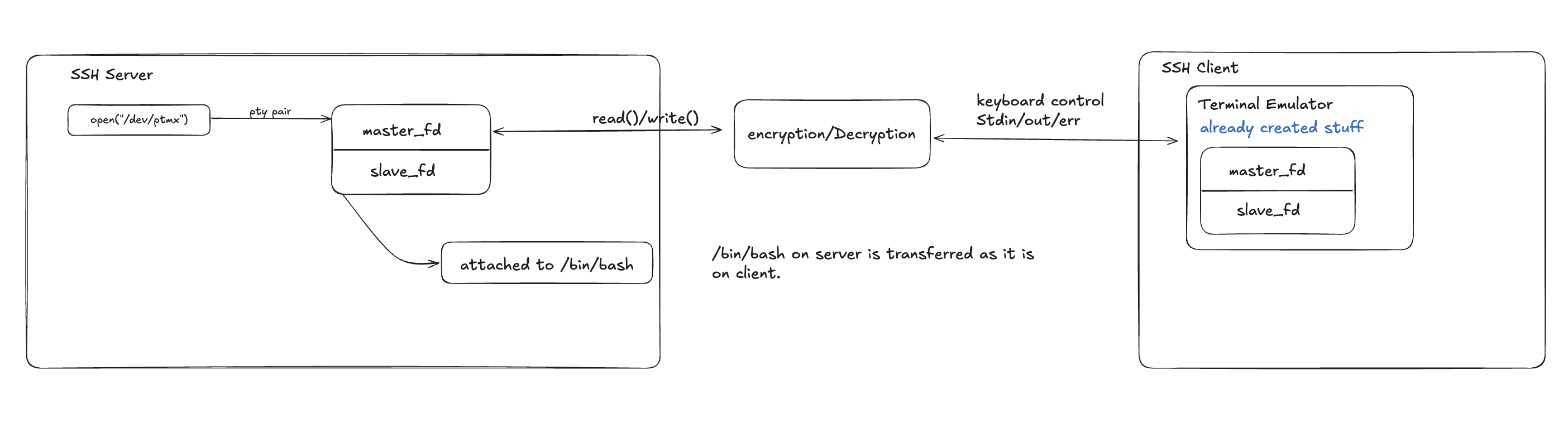
We need custom SSH server that accepts any username, require no authentication and handles the PTY. This is already handled well by rustssh in Rust. Here is the checklist for what we need to do
- setup
russhserver - Setup custom Handler so that no authentication is required and all username is accepted
async fn auth_none(&mut self, user: &str) -> Result<Auth, Self::Error> {
    info!("Auth none for user: {}", user);
    self.username = Some(user.to_string());
    Ok(Auth::Accept)  // Accept without authentication
}

async fn auth_password(&mut self, user: &str, _password: &str) -> Result<Auth, Self::Error> {
    info!("Auth password for user: {}", user);
    self.username = Some(user.to_string());
    Ok(Auth::Accept)  // Accept any password
}

async fn auth_publickey(&mut self, user: &str, _public_key: &key::PublicKey) -> Result<Auth, Self::Error> {
    info!("Auth publickey for user: {}", user);
    self.username = Some(user.to_string());
    Ok(Auth::Accept)  // Accept any public key
}- Define a function to run your program now
pub fn run_my_program(
	handle: Handle,
) -> Result<()> {
	// can use portable_pty crate here
	// create PTY master and slave
	// get read() and write() handle for master
	// on the slave spawn your program
	// use read() to read from terminal slave and to send it to client
	// use write() to receive SSH input and write to PTY
}- Define how handler should handle data . when out program reads something from PTY , we send it to client.
Caveats
- Since the port 22 is to be used by
rustsshserver, we need to somehow manage our instance openssh server, by making it run on different port. i.e on/etc/ssh/sshd_configaddPort 2222on top. then restart the sshd daemon.
sudo sed -i '1iPort 2222' /etc/ssh/sshd_config
- if you are using AWS instance, then you might want to add the port to your security group.